Available now · Free during beta

A shack dashboard that
actually respects your time.

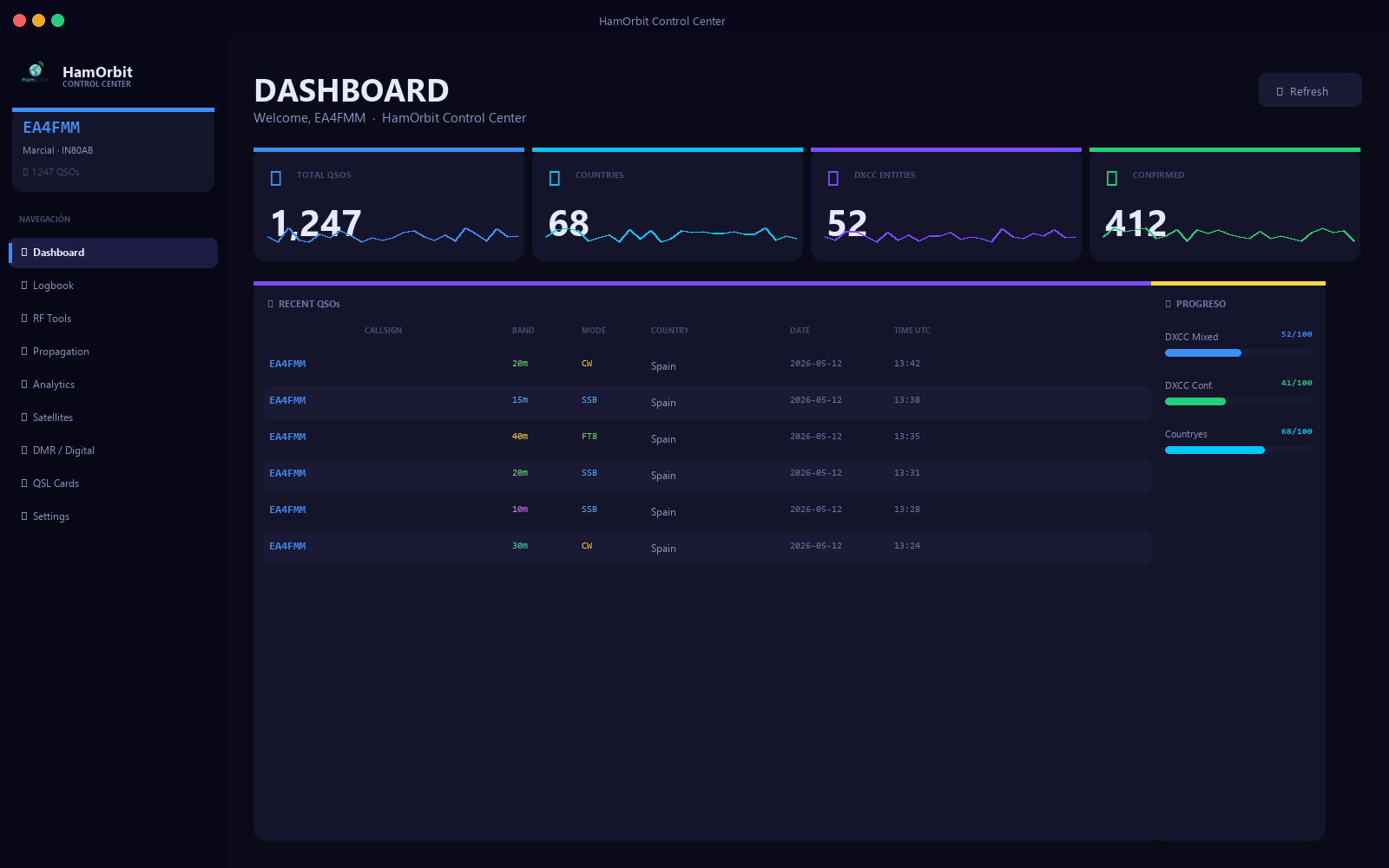
HamOrbit is a free Windows desktop app for amateur radio operators. Logbook, satellite passes, world clocks, contest calendar, awards tracker — all in one window. Built by an active operator (EA4FMM).

~12 MB installer 🪟 Windows 10/11 🔒 Local-first, no account 📡 SGP4 satellite tracking
HamOrbit dashboard screenshot
v1.0.0 Logbook Satellites Awards
🪟 Windows 10 / 11
📂 ADIF import & export
🛰 SGP4 + CelesTrak TLEs
NOAA solar feed
🔒 No telemetry, no account
🆓 Free during beta

Everything an active operator actually uses.

No bloat, no upsell, no subscription. Just the tools you reach for every time you sit down at the rig.

📝

Logbook with ADIF I/O

Log QSOs in seconds. Import your existing ADIF from any logger. Search, filter, and export anytime — your data stays on your disk.

🛰️

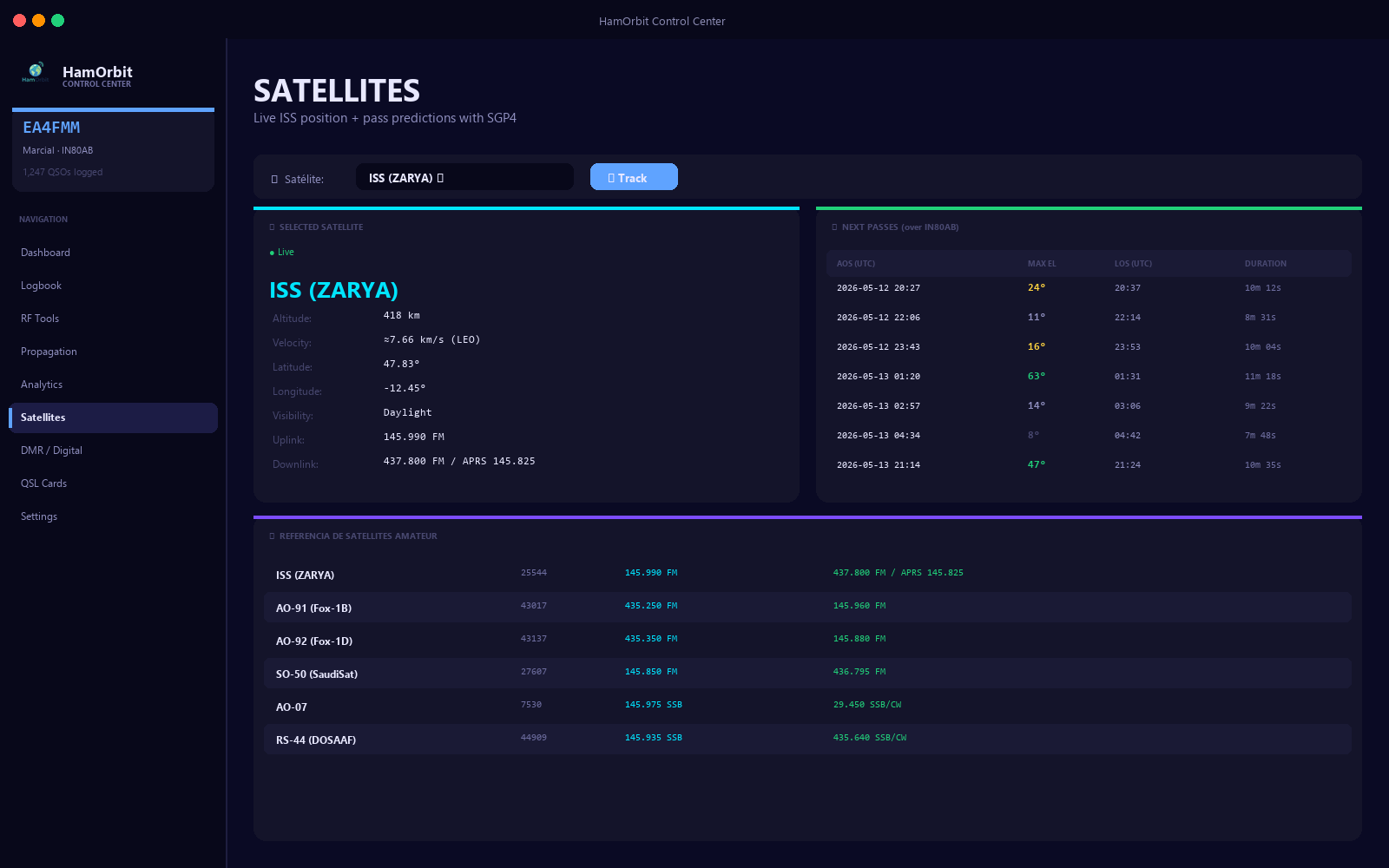
Live satellite tracker

SGP4 propagation with CelesTrak TLEs. See the next AOS/LOS for ISS, AO-91, SO-50, the QO-100 footprint and dozens more.

🌍

World clocks & grey line

Half a dozen DX-friendly cities side by side. Grey line indicator so you know when 80 m is going to open to the antipodes.

🏆

Awards tracker

DXCC, WAS, WAZ, IOTA, SOTA — progress bars and "what's missing" lists pulled straight from your logbook.

📅

Contest calendar

Upcoming HF and VHF contests at a glance. CQ WW, ARRL DX, IARU, WPX — never miss the start of a serious weekend.

Quick log + macros

Single-keystroke logging during runs. Save common exchanges as macros for SSB / CW / digital modes.

📊

Solar & band conditions

SFI, A, K and MUF/foF2 from NOAA. Quick visual of which bands are actually worth turning the rig on for.

📡

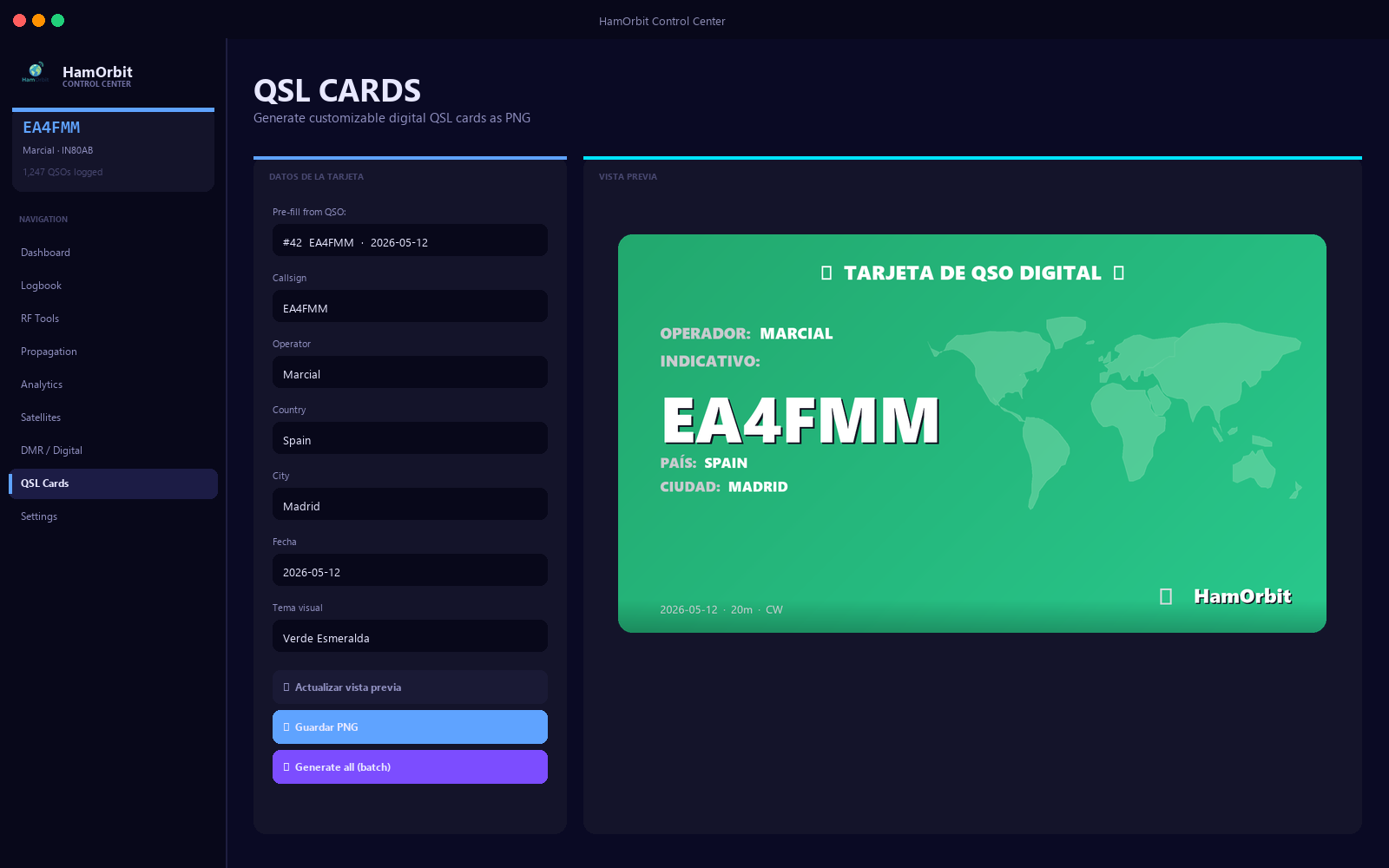
QSL helper

Generate printable QSL cards from your logbook. Track which contacts you've already confirmed via LoTW, eQSL or paper.

🔐

Local-first & private

SQLite database in %APPDATA%. No cloud account, no telemetry, no ads inside the app. Your log is yours.
Sponsored

From download to first QSO logged in 60 seconds.

No account, no setup wizard, no "verify your email". Install and go.

1

Download the installer

One .exe file, ~12 MB. Signed where possible. Hosted on GitHub Releases — same place a thousand other open-source ham tools live.

2

Run it once

Standard Windows installer. Picks a sane default folder. Creates a local SQLite database under %APPDATA%\HamOrbit. That's it.

3

Import your existing log

Drag your ADIF in. Hundreds of QSOs imported in a few seconds. Or start fresh — first QSO logged in under a minute.

The logbook

A logger that disappears into the background.

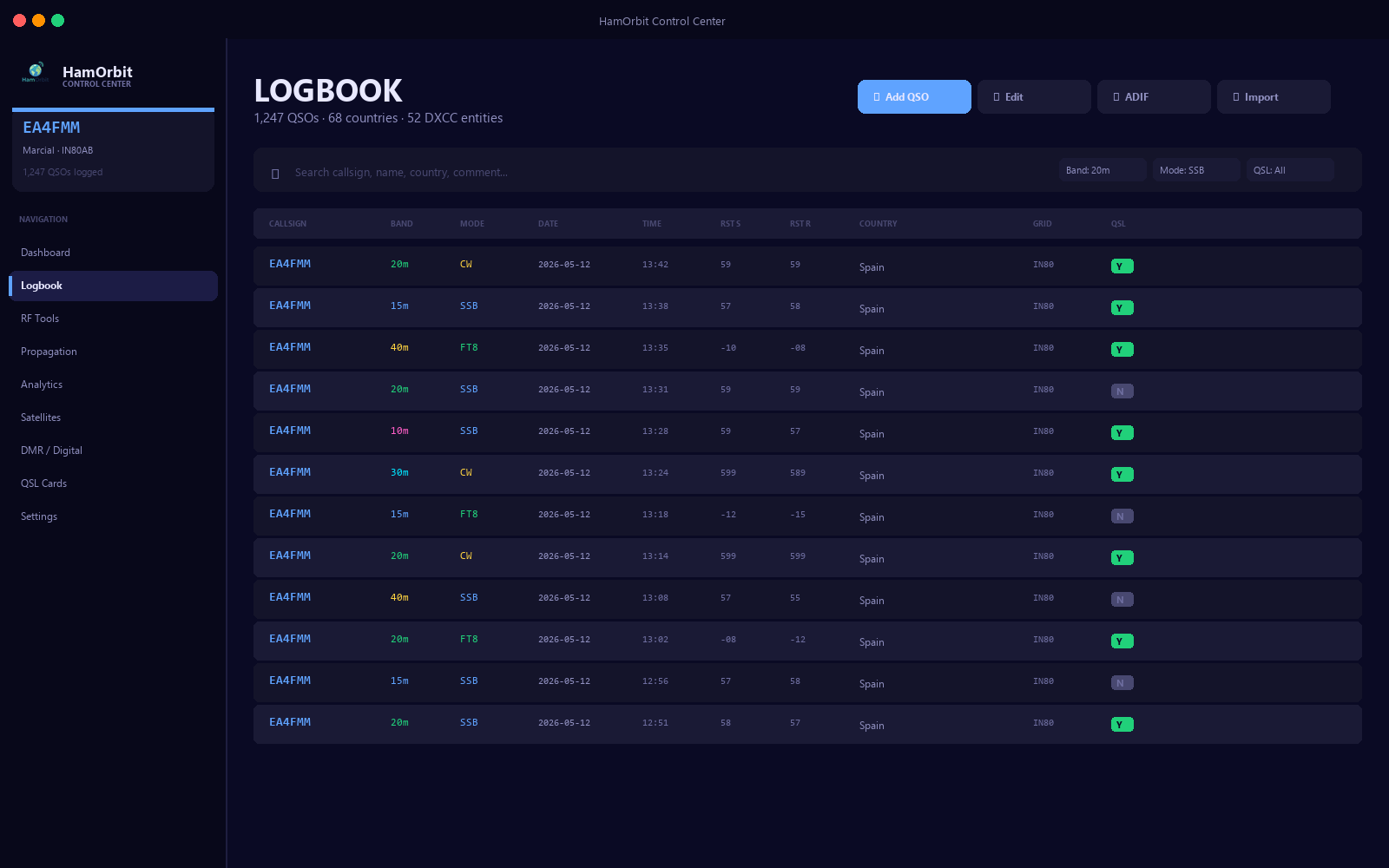
The fastest QSO logger we could build. Tab through fields. Keyboard-only flow for serious operating sessions. Sane defaults so 90% of contacts need only a callsign and a band.

  • Full ADIF 3.1.4 import & export
  • Live duplicate detection while typing
  • Per-band, per-mode QSO counts in the status bar
  • Filterable history view with grep-style search
  • Backup-friendly: one SQLite file, copy it anywhere
Logbook screenshot

Satellite tracker

SGP4 propagation, no internet required after first sync.

Pulls TLEs from CelesTrak once a day and caches them locally. Computes passes with the same SGP4 algorithm used by every serious tracker — so the numbers match Gpredict, ISS Tracker, and N2YO.

  • ISS, AO-91, SO-50, RS-44, QO-100, dozens more
  • Elevation, azimuth and Doppler shift in real time
  • Pass schedule for the next 24 h, sorted by max elevation
  • Ground-track overlay on a world map
  • Add your own satellite by TLE
Satellite tracker screenshot

Awards & analytics

See your progress without exporting to a spreadsheet.

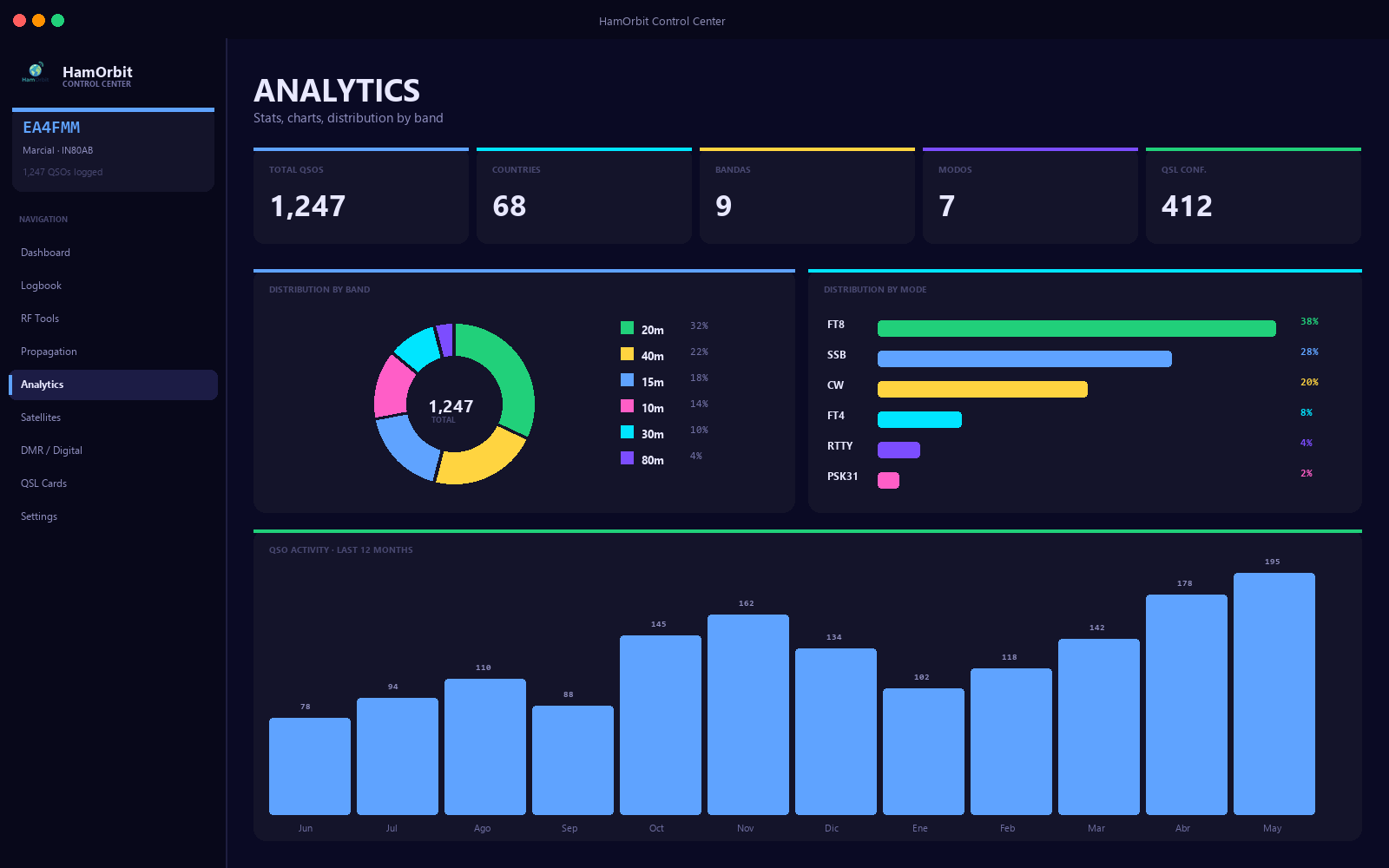
The awards tab reads your logbook and answers the question every operator asks: which entities am I still missing? Plus a handful of charts that are actually useful — band activity by hour, QSOs per month, mode mix over the years.

  • DXCC mixed / phone / CW / digital progress
  • WAS, WAZ, IOTA, SOTA, POTA progress bars
  • "Still needed" lists you can hand-print
  • QSO heatmap (hour-of-day × day-of-week)
  • Mode and band breakdown over time
Analytics screenshot
100%
Free during beta
~12 MB
Installer size
0
Telemetry calls
1
Active operator behind it

How does it compare?

Honest checklist against the loggers most operators have tried.

Feature HamOrbit HRD Free Log4OM Generic web logger
Free, no subscription Trial only Yes Limited tier
Local-first (works offline) Yes Yes No
Built-in satellite tracker No No No
Awards progress at a glance Partial Yes Partial
World clocks & grey line No No No
Modern UI built this decade No Updated Yes
Installer under 20 MB No No N/A

Honest pricing.

Free during beta. Paid tiers are paused until the Free version proves itself with real operators.

Plus
· coming later
  • CAT control (Hamlib bridge)
  • Real-time DX cluster
  • Optional cloud-sync logbook
  • Priority email support
Pro
· coming later
  • Everything in Plus
  • SDR waterfall view
  • Multi-op contest console
  • Direct LoTW / eQSL sync

Honest answers.

If something is missing here, just email hello@hamorbit.com.

Is HamOrbit really free?

Yes — the Free tier is fully usable and unlimited. There is no trial timer. Paid tiers exist in the roadmap but are closed until the Free version proves itself with real users.

Does it work on macOS / Linux?

Right now it's Windows-only. macOS and Linux builds are on the roadmap once the codebase stabilises. If you want to be notified, drop your email in the newsletter above.

Where is my logbook stored?

In a local SQLite file at %APPDATA%\HamOrbit\hamorbit.db. Nothing is uploaded anywhere. You can copy that file to back it up, or export to ADIF anytime.

Does it support CAT control of my rig?

Not in the Free tier yet — CAT (Hamlib bridge) is planned for the Plus tier. The current Free build is focused on logging, propagation, satellites and awards.

Will it import my existing log?

Yes. HamOrbit reads standard ADIF (versions 3.0 and up). Tested against exports from N1MM, Log4OM, Ham Radio Deluxe, QRZ.com and LoTW. Hundreds of QSOs import in seconds.

Is the data sent anywhere?

No. The desktop app makes outbound requests only to fetch satellite TLEs (CelesTrak) and solar data (NOAA). Your logbook never leaves your disk unless you export it manually.

Who's behind it?

One licensed amateur radio operator (callsign EA4FMM) building it solo. No company, no investors, no growth team.

Sponsored
Free during beta

Ready to try it?

One installer. Twelve megabytes. No account, no credit card, no email required. Just download and run.

⬇ Download HamOrbit for Windows